
EPP Law
A paper claims form, now one online form in three languages
- Professional Services
- Zero claim details re-keyed after submission
EPP Law's claims intake started on paper: a printed form, scanned, emailed, filed by hand and keyed into a spreadsheet, in English only. TechRam built one guided online form in English, Arabic and Chinese that files each claim to SharePoint, the live register and the client's inbox at once, with nothing re-keyed.
Zero
claim details re-keyed after submission
3
languages, including right-to-left Arabic
The organisation
EPP Law and its sister brand Insurance Solutions Providers help drivers through one of the more stressful moments of car ownership: a not-at-fault motor vehicle collision. ISP runs claims and repair coordination; EPP Law handles the legal side.
Where it started
Every claim started on paper. A client filled in a printed form, the office scanned it, emailed it, filed it by hand and keyed the details into a spreadsheet. Forms came back half-completed or illegible, and supporting documents arrived separately from the form they belonged to.
Because it was English-only and paper-bound, Arabic- and Chinese-speaking clients needed a staff member to walk them through it line by line. For a business whose value is moving claims quickly and accurately, intake had become the bottleneck.
What we built
One online claim form, and the automation behind it, so a single submission files everywhere it needs to go with nothing re-keyed.
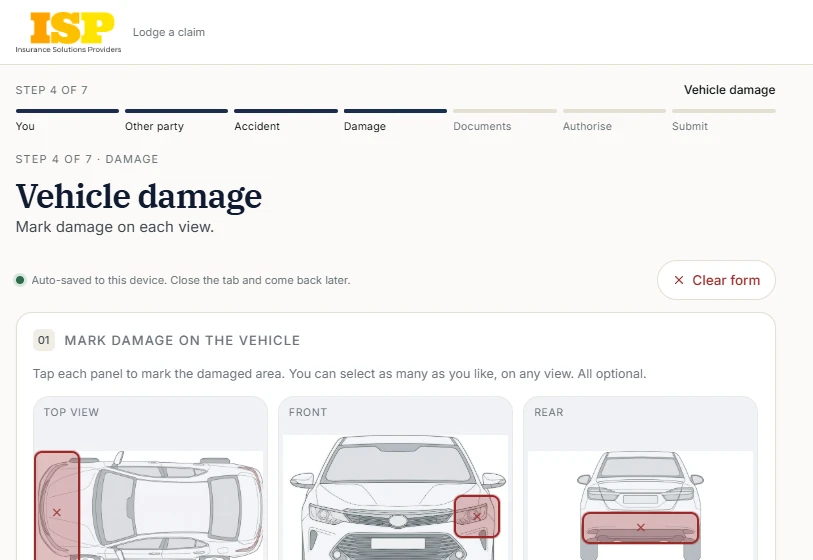
The form is a guided, mobile-first wizard. Clients enter their own details, the other party’s, the accident and the damage — including a tap-to-mark car diagram instead of a hand-drawn sketch — upload their documents and sign the Authority to Act on screen. It runs in three languages.
Every submission then triggers a pipeline:
- A unique claim ID is generated and shown to the client immediately
- A dedicated SharePoint folder is created through the Microsoft Graph API, holding every uploaded document and generated PDF
- A row is appended to the live register, linked to that folder, so staff have one always-current view
- A branded confirmation email goes to the client with the signed Authority to Act attached, and the claims team is copied
Where it went
A process that was a paper form, a scan, an email, a manual filing and a spreadsheet entry is now one digital submission, in three languages, with the record assembled as it happens rather than afterwards.
Common questions
01. What was the bottleneck before?
Every claim started on paper. A client filled in a printed form, the office scanned it, emailed it, filed it by hand and keyed the details into a spreadsheet. Forms came back half-completed or illegible, and supporting documents arrived separately from the form they belonged to.
02. Why did the form have to run in three languages?
Because the paper one was English-only, Arabic- and Chinese-speaking clients needed a staff member to walk them through it line by line. For a business whose value is moving claims quickly, intake had become the bottleneck.
03. What happens when a client submits it?
A unique claim ID is generated and shown to them immediately, a dedicated SharePoint folder is created through the Microsoft Graph API holding every uploaded document and generated PDF, a row is appended to the live register linked to that folder, and a branded confirmation email goes out with the signed Authority to Act attached.
04. Is any of this specific to legal claims?
Two parts are: the tap-to-mark car diagram and the Authority to Act signed on screen. The rest is a guided mobile-first form whose single submission files everywhere it needs to go with nothing re-keyed.
Updated